Securing Authentication Routes with Next.js Proxy (Middleware)
Learn how to protect your authentication flow using Next.js Proxy (formerly Middleware). security is a very serious issue, so it always very important for us to protect our route against unauthorized access. Today we will be securing our authentication using middleware now called proxy.


Security is a very serious concern, so it is always important to protect your application against unauthorized access. In this article, we'll secure our authentication flow using Proxy (formerly called Middleware) in Next.js.
Creating the Proxy
Create a file named either:
proxy.ts
or (older naming)
middleware.ts
Note: In newer versions of Next.js, Middleware has been renamed to Proxy. The file and exported function should follow the conventions required by your Next.js version.
Public vs Private Routes
Securing routes is all about choice and design. Before writing any code, think about which routes should be public and which should be private.
Every route that is part of the process of authenticating a user should remain public.
Public Routes
POST /api/auth/signup
POST /api/auth/signin
POST /api/auth/verifyEmail
POST /api/auth/forgotPassword
POST /api/auth/resetPassword

GET /signin
GET /login
Think of it this way:
Any route that is part of the process of authenticating a user should be public.
A user who has not signed in yet cannot possibly have a session, so protecting these routes would prevent them from creating an account or logging in.
Routes that require an already authenticated user should be private.
Private Routes
GET /dashboard
GET /dashboard/profile

POST /api/posts
POST /api/logout

PATCH /api/profile

DELETE /api/account
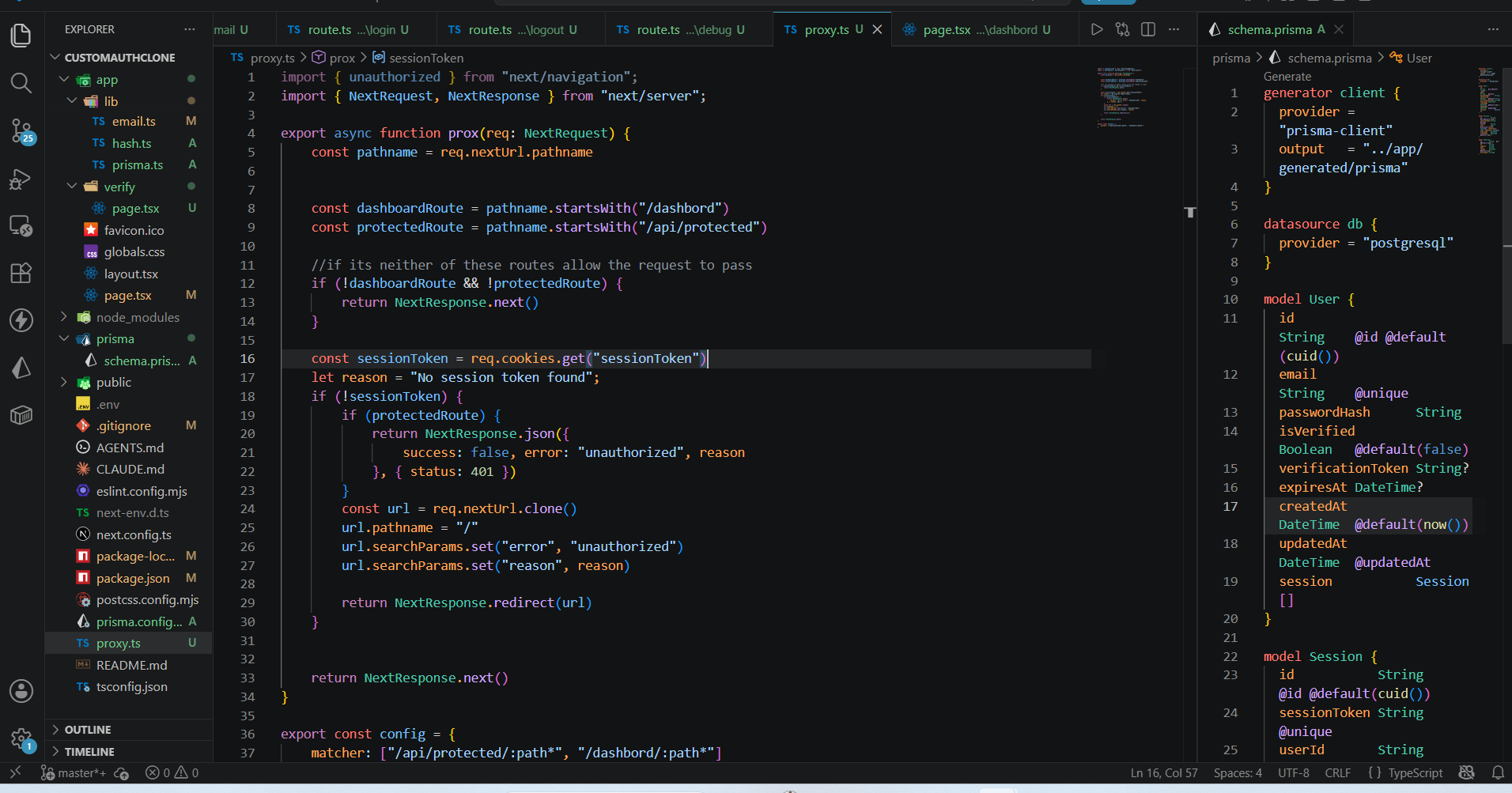
My Middleware Design Process
When designing middleware, I normally think about it this way:
- What routes or pages do I actually want to protect?
- If the request is not for one of those routes, simply allow it to pass.
- If the user is not signed in and is requesting a protected API route, return a raw JSON response with a 401 Unauthorized status.
- If the user is not signed in and is requesting a protected page, redirect them instead.
The important question is:
What is requesting the page?
If JavaScript is calling an API endpoint, it expects JSON.
If the browser is requesting a page, it expects HTML.
Returning JSON for a browser page is not a good user experience. Redirecting the user is usually the better choice.
Using NextRequest
In middleware, it is more common to use NextRequest instead of the standard JavaScript Request.
NextRequest provides useful Next.js-specific features.
For example:
request.nextUrl
Unlike:
request.url
which is just a string, nextUrl is already a parsed URL object with access to methods such as:
pathnamesearchParamsoriginhostname
This means you don't have to manually convert the URL using JavaScript.
Getting the Session Cookie
Next, we retrieve the sessionToken, which identifies a logged-in user.
const sessionToken = request.cookies.get("sessionToken");
Cookies work differently in middleware than they do in Route Handlers or Server Components.
Since middleware already receives the incoming request, we access cookies directly from:
request.cookies
instead of:
cookies()
Middleware runs in a different execution timeline than Route Handlers and Server Components, so the cookies() helper from next/headers is not available here.
request.cookies represents the cookies that came with the incoming request.
Handling Unauthorized Users
If a user does not have a valid session token and attempts to access a protected route, we can either return an error or redirect them.
For protected API routes:
401 Unauthorized
For protected pages:
Redirect to /
Redirecting Users
To redirect a user, we first clone the incoming URL.
const url = request.nextUrl.clone();
Cloning the URL is simply good practice because it avoids mutating the original request URL.
We then change the pathname:
url.pathname = "/";
Next, we attach any query parameters we want.
url.searchParams.set("error", "unauthorized");
url.searchParams.set("reason", "No session token");
Finally, we redirect.
return NextResponse.redirect(url);
Could We Use Normal JavaScript?
Yes.
Using the standard JavaScript Request, we'd first need to convert the string URL into a URL object.
const url = new URL(request.url);
or
const url = new URL(PATH, BASE_URL);
The URL constructor gives us access to methods such as:
pathnamesearchParamsorigin
Fortunately, Next.js has already done this work for us through:
request.nextUrl
Why NextResponse.redirect() Instead of redirect()?
Middleware runs very early in the request lifecycle.
At this point, React has not started rendering.
Because middleware is dealing directly with HTTP requests, we use:
NextResponse.redirect()
Under the hood, it creates an HTTP redirect response (typically a 307 Temporary Redirect). The browser receives this response and automatically makes another request to the new location.
On the other hand,
redirect()
from next/navigation does not create an HTTP response.
It is designed for React rendering, Server Components, and Server Actions. Internally, Next.js catches it and performs the redirect during rendering.
Using Matchers
By default, middleware runs for every request.
This can waste resources because not every route needs authentication.
Next.js provides matchers to solve this.
A matcher is simply an array that tells middleware which URL paths should trigger it.
export const config = {
  matcher: [
    "/dashboard/:path*",
    "/api/protected/:path*",
  ],
};
Wildcards can also be used.
/dashboard/:path*
This matches:
/dashboard
/dashboard/profile
/dashboard/settings
/dashboard/settings/account
In other words, it matches the route and everything underneath it.
Conclusion
Middleware (Proxy) is one of the first lines of defense in a Next.js application.
The most important design decision is identifying which routes should be public and which should be protected.
- Public routes are part of the authentication process.
- Private routes require a valid session.
Once that distinction is clear, implementing middleware becomes much simpler.
Feel free to contribute, suggest improvements, or point out any corrections.
Comments (0)
No comments yet. Be the first to share your thoughts.